





- Artwork Requirements
- Design Time Vs Production Time Policy
- Free Design Policy
- Creating Sign Designs with Freelancers
- Why Not Use Canva for Sign Design
- Creating Advertising Designs with AI: Using the “In the Style Of” Method
- How to Write a Good AI Prompt for Advertising Design
- 2 ways to make complex AI-generated designs “print-ready”
Creating a simple sign design today is easier than ever thanks to modern AI tools. Even if you have no design experience, you can generate a professional-looking concept for your sign in just a few minutes — completely free.
Many of our customers successfully use AI tools to quickly create designs for:
- yard signs
- real estate signs
- construction signs
- business advertising signs
- event banners
- vehicle magnets
AI works best for creating a quick concept or draft design, which can then be printed or slightly refined before production.
If you are preparing artwork for printing, please also review our Artwork Requirements page.
Step 1 — Choose a Free AI Design Tool
There are many free AI image generators available online.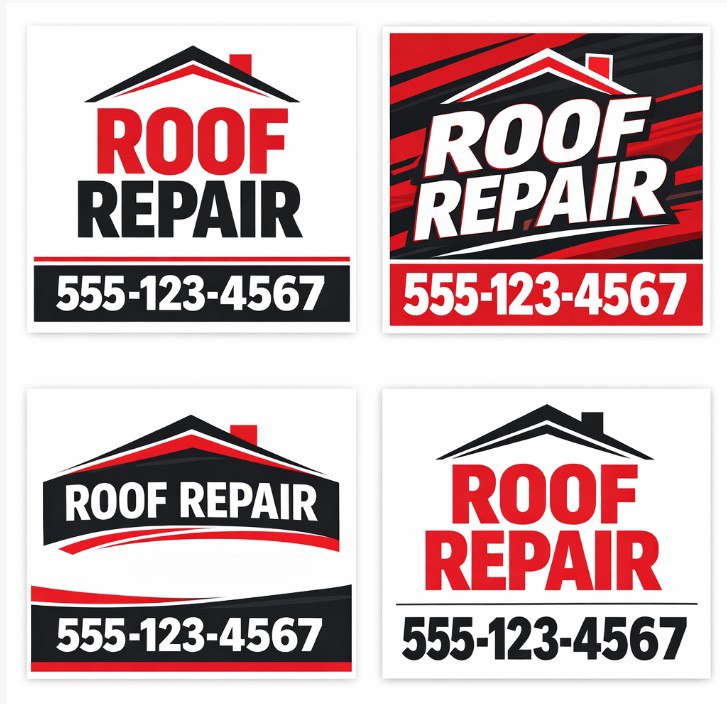
Popular options include:
- ChatGPT image generation
- DALL-E
- Leonardo AI
- Bing Image Creator
- Midjourney
These tools allow you to generate a design by simply describing what you want.
Example prompt:
“Simple yard sign design for landscaping company. Green and white colors. Large bold text: Lawn Care Services. Phone number at bottom. Clean professional layout.”
Within seconds, the AI will generate several design concepts.
Step 2 — Use AI for the Design Concept
AI is extremely useful for generating initial design ideas.
However, AI designs sometimes need small adjustments before printing, such as:
- correcting spelling
- improving text alignment
- adjusting margins
- improving resolution
- preparing files for printing
Because of this, AI designs are best used as a starting point or sketch rather than a final production file.
Step 3 — Improve the Design with a Freelancer (Optional)
If you want a more polished design, you can hire a freelance designer to refine the AI concept.
Platforms like Fiverr or Upwork offer many designers who specialize in simple sign layouts.
Typical prices for basic designs:
| Design Type | Typical Price |
| Simple yard sign | $10 – $25 |
| Banner design | $15 – $40 |
| Vehicle magnet | $20 – $50 |
A freelancer can usually prepare a print-ready file within 24 hours.
This approach is very affordable and can save a lot of time.
Step 4 — Export Your File for Printing
The easiest file formats for printing signs are:
JPG or PNG
Recommended settings:
- real size (actual sign dimensions)
- resolution 150 DPI
- RGB color mode
Example:
For a 24 × 18 inch yard sign, the image size should be approximately:
3600 × 2700 pixels
This resolution is ideal for large-format sign printing.
For more details, please review our Artwork Requirements page.
Step 5 — Send the File to Us
Once your design is ready, simply upload the file when placing your order or send it to us.
Our team will quickly check:
- resolution
- margins
- file size
- compatibility with printing
If small adjustments are needed, we often fix them free of charge.
Important Sign Design Tips
Keep your design simple
Signs are usually viewed from a distance.
Large text and simple layouts work best.
Avoid too much text
People should be able to read your sign in 2–3 seconds.
Use high-contrast colors
Examples of effective combinations:
- black / yellow
- white / red
- blue / white
- black / white
Avoid very small details
Tiny text or graphics may not be visible from a distance.
Example AI Prompt for a Yard Sign
Here is a simple prompt you can use in any AI image generator:
“Professional yard sign design for roofing company. Red, white and black colors. Large bold headline: ROOF REPAIR. Phone number at bottom. Clean layout, easy to read from distance.”
AI will generate several layout options that you can choose from.
AI Design + Fast Printing
Using AI to create a quick concept and then printing it professionally is often the fastest and most affordable way to produce signs.
This approach works especially well for:
- real estate signs
- construction signs
- yard signs
- event signs
- temporary business advertising
Need Help Preparing Your Design?
If you already created a design with AI, simply send it to us.
We can usually prepare it for printing very quickly.
Basic adjustments are often included free when you order printing with us.
FAQ
Can AI generate a full sign design?
Yes. AI can generate very good design concepts. However, minor adjustments are often required before printing.
What file format should I send?
The easiest formats are:
JPG or PNG at 150 DPI in real size.
Can you help fix my AI design?
Yes. If only small adjustments are needed, we often correct them for free when you place an order.
What if I don’t want to use AI?
You can hire a freelance designer very cheaply. Many simple sign layouts cost $10-$30 to create.
- Artwork Requirements
- Design Time Vs Production Time Policy
- Free Design Policy
- Creating Sign Designs with Freelancers
- Why Not Use Canva for Sign Design
- Creating Advertising Designs with AI: Using the “In the Style Of” Method
- How to Write a Good AI Prompt for Advertising Design
- 2 ways to make complex AI-generated designs “print-ready”